
Built in Kuala Lumpur for Malaysian restaurants
Know your margin every day, for every outlet.
ChowChirp takes your supplier invoices, stock counts, rosters and kitchen tickets and turns them into numbers you can defend. One login for every outlet. Every figure traces back to a photo, a count or a person.
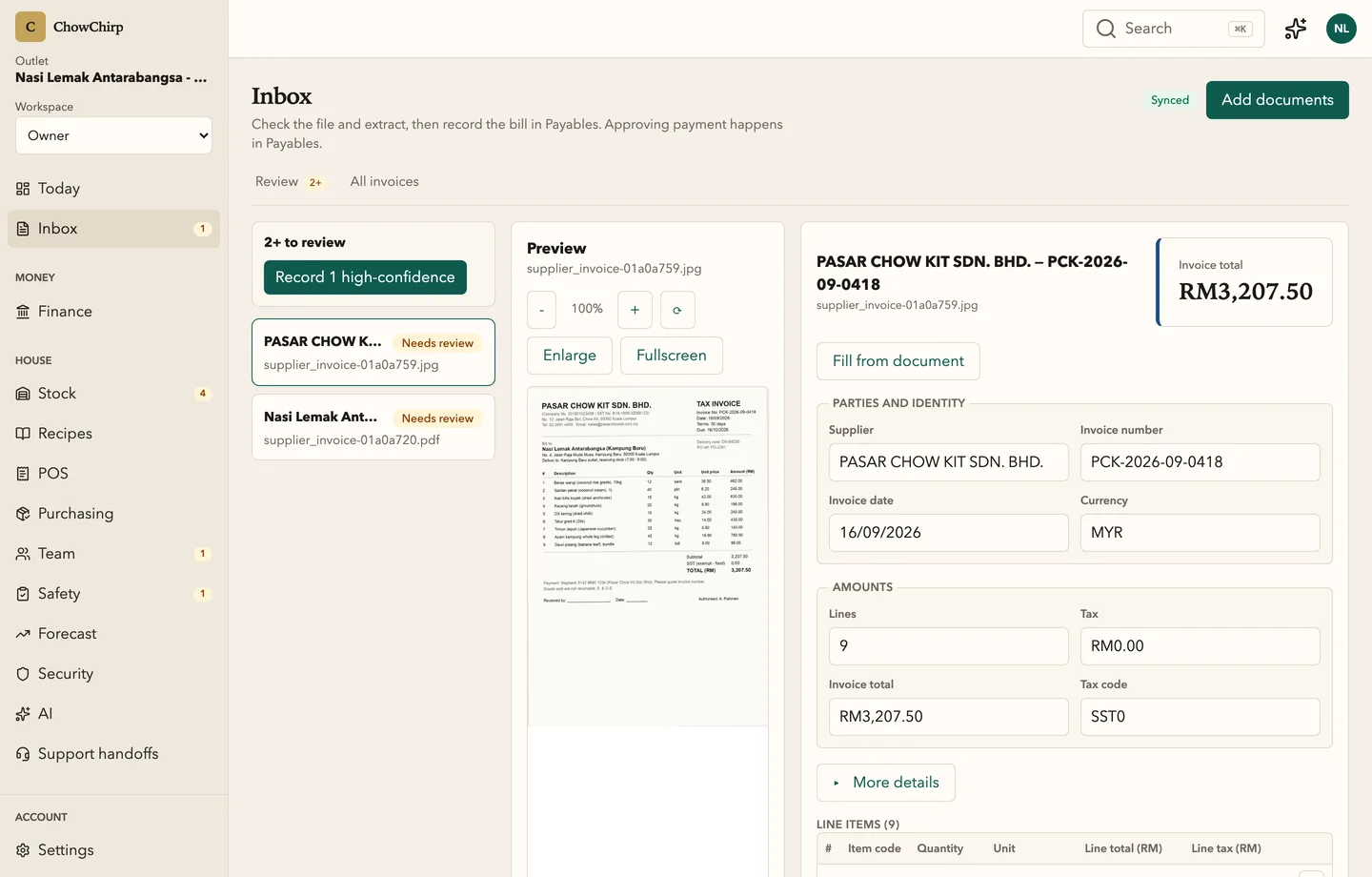
- Invoice photo to approved bill in one review screen
- English and Bahasa Melayu throughout
- Kitchen keeps running when the internet drops

Why another dashboard is not enough
Your POS tells you what sold. It cannot tell you what it cost.
By the time the accountant closes the month, the margin has already gone. Invoices sit in a drawer. Stock counts live in a spreadsheet. Rosters live on WhatsApp. Nobody owns the truth, so nobody can defend it.
How it works
Capture. Review. Approve. See. Ask.
The same loop restaurants already run by hand, without the retyping.
Capture
Photograph invoices, count stock, clock shifts, log fridge temperatures. Everything lands as a stamped entry.
Review
The AI reads the document and fills the fields. A person checks the exceptions, keyboard first.
Approve
One approval posts the bill to payables and the lines to stock. High-risk actions ask for a second factor.
See
The owner dashboard shows what needs you today. Every number opens to the entry behind it.
Ask
Ask the advisor why food cost moved. It answers with cited facts and drafts a proposal for you to approve.
What owners get
Numbers you can defend, from every outlet.
Invoices reviewed in minutes, not weekends
Snap the invoice. The fields fill in. Check the ones that matter and press approve. The bill, the stock lines and the supplier price history update together.
One login for every outlet
Switch outlets without switching systems. Give managers only their outlet. Keep one audit trail for the whole group.
Nothing is quietly edited
Every change is a stamped entry with a name and a time. Corrections add a new entry instead of overwriting the old one.
Compliance in the daily flow
SST lines, e-Invoice records, food-handler and typhoid expiry, temperature logs and halal records live where the work happens and export as evidence packs.
AI that proposes, people who decide
The advisor reads, explains and drafts. It never posts, pays or files. Every approval is on the record with a name.
Built for Malaysia
RM and sen exact. SST 6% and 8% lines. Bank Negara rounding. Malay and English. Ramadan and public holidays in the roster and the forecast.
Product facts, not promises
Built to be checked.
- Every high-risk action needs a second factor: an authenticator code, a backup code or a passkey. In the product
- Exports list the fields they redact and use a one-time download link that is never stored in the page. In the product
- Inspection packs are shared through an expiring link, and every view is logged. In the product
- The kitchen node on your premises keeps tickets moving during an internet outage and uploads them in order when it returns. In the product
Made for the people who run the place
Whoever you are in the restaurant, there is a screen for your day.

For owners
ChowChirp gives owners one login for every outlet, a daily list of what needs a decision, and a trail behind every figure. You stop chasing spreadsheets and start approving with evidence.

For managers
ChowChirp is built around the manager's week: the invoice queue, the delivery dock, the stocktake, the roster and the alerts. Every task is one screen, keyboard or thumb first.

For accountants
ChowChirp gives you payables with the document attached, SST lines on every bill and sale, e-Invoice records with their validation details, and exports in AutoCount and Xero friendly layouts. It records; you file.

For kitchens
ChowChirp keeps recipe costs current from real invoices, tells the floor what is safe and what is short, and runs the kitchen board from a node in your own shop.
The product
Eleven modules, one login
Invoices and documents
Supplier invoices, credit notes and delivery notes go from a photo to an approved bill in one screen. The AI fills the fields, a person checks the exceptions, and one approval posts to payables and stock.
Finance and payables
Every approved bill lands on one aging board, matched to its purchase order and delivery. Petty cash, cash position, SST and e-Invoice records and the month-end close live in the same place, with the evidence attached.
Stock
Receive deliveries against purchase orders, count stock on a phone, log waste and transfers, and see what every balance is based on. Low-confidence numbers tell you which count would fix them.
Recipes and menu
Costed recipes tie your menu to your stock. Menu engineering sorts dishes into stars, plowhorses, puzzles and dogs. The allergen matrix and the feasibility board tell the floor what is safe and what is short before service.
Purchasing
Requisitions, purchase orders, quotes, supplier comparison and receiving in one numbered pipeline. Every order carries Malaysian tax codes and links forward to the delivery and the invoice.
- Early access
Kitchen and counter
Kitchen display screens that keep working when the internet drops, a cash counter that cannot double-charge, and a floor plan with reservations and a waitlist. Installed and handed over by a trained installer.
Team
Rosters, clock-ins, leave, payroll runs and service-charge distribution for every outlet, with permit and certificate expiry watched for you. Built for teams that speak Malay and English.
Food safety
Temperature checks, cooking and cooling controls, cleaning runs, HACCP records, halal records, incidents and licences in one place. Generate an inspection pack for MOH, JAKIM, DBKL or MeSTI and share it through an expiring link.
Loss prevention
Voids, no-sales and discounts reviewed by someone other than the person who made them. Till variances, deposits and safe counts reconciled. Cases with a chain of custody, and evidence released only to a named recipient.
Owner dashboard
The owner dashboard pulls the work from every outlet into one prioritised list. Alerts, corrective actions, crisis reports, exports and the audit explorer sit behind it. Every figure opens to the entry that produced it.
AI advisor
The advisor answers questions about your own numbers, cites the facts under every answer, and drafts proposals for a person to approve. It never posts, pays or files on its own.
Frequently asked questions
Do I have to replace my POS?
No. ChowChirp starts with the work your POS does not do: invoices, stock, recipes, rosters, food safety and money. It also includes a cash counter, kitchen screens and a floor plan for outlets that want them, but you can keep your existing till.
Does it work for a single outlet?
Yes. Single outlets use the same product, usually starting with invoices and stock. The Group tier adds the tools that matter once you run more than one outlet.
Does ChowChirp file my SST or submit e-Invoices for me?
ChowChirp prepares and records the figures and keeps the evidence. Filing stays with you and your accountant. Where a MyInvois connection is configured, consolidated e-Invoice records can be submitted, and the screen always says what was recorded versus what was sent.
Does it work in Bahasa Melayu?
Yes. Every screen is available in English and Bahasa Melayu, and each person picks their own language.
How long does it take to get started?
Most outlets start with invoices and stock in the first week. Kitchen screens and counter sales are installed by a trained installer, with a written handover you accept before it goes live.
See ChowChirp on your own invoices.
A 30-minute walkthrough on a screen share. Bring three real supplier invoices and we will run them through the review loop live.